BlockFit now works with your AI assistant
Ask your AI assistant to find you a class at an independent studio in Brighton & Hove, and it can now book it for you on BlockFit, within a weekly limit you set.
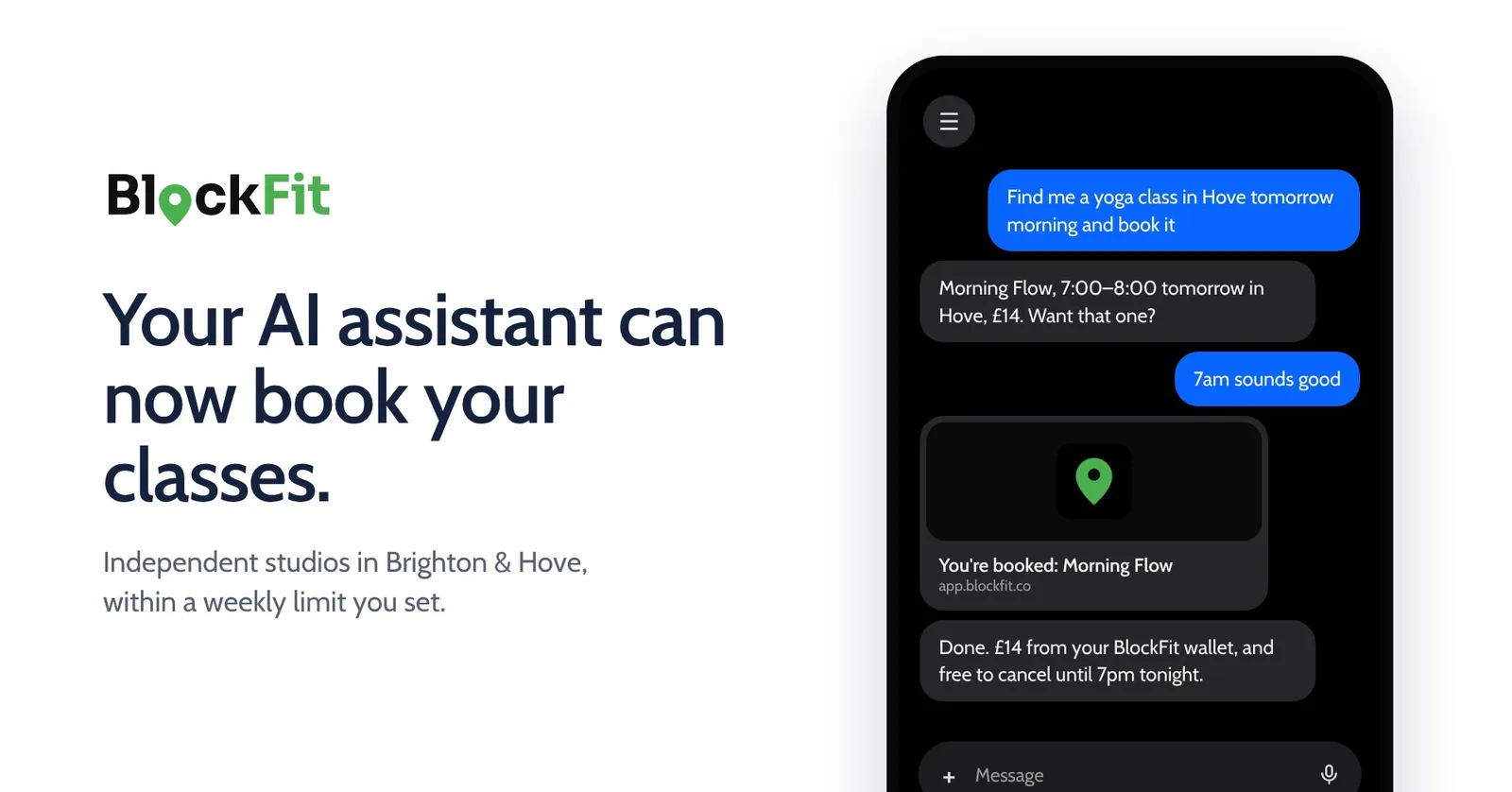
If you use one of the new AI assistants, you can now ask it to find you a class at an independent studio in Brighton & Hove, and it can go ahead and book it for you on BlockFit.
I've been playing around with Muse, Meta's new personal assistant, since it launched in the UK earlier this week, and pretty quickly the thing I wanted it to do was book me a class. 'Find me a great yoga class in Hove tomorrow morning and book it' is exactly the sort of thing people are going to ask these assistants, and I think that's going to happen a lot sooner than most of us expect.
The problem is that most booking sites are built for people clicking around in a browser, and an assistant turning up on its own tends to look a lot like a bot. So it either gets blocked, or it gives up, or it tells you to go and do it yourself. Which rather defeats the point.
So I've spent the last couple of days making sure that when someone asks their assistant to book a class in Brighton, BlockFit is somewhere it can actually do it.
Trying it out
The first proper tryout was on our test site, with fake money, before any of what we're announcing today went live. I asked Muse to book me a 7am yoga class on Saturday. I didn't give it a direct link, or any setup, or any instructions on how BlockFit works.
It found its own way to our test site, read a small file there that tells assistants what BlockFit does and how to sign in, and then asked me to approve it. I tapped Allow on a BlockFit page, set how much it was allowed to spend each week, and a few seconds later had a confirmation email in my inbox: £14 from my wallet, along with a line I was quite pleased to see, 'Booked by Muse, an app you connected to BlockFit.'
Ok, so it didn't go quite that smoothly first time, I'll admit. Earlier in the day Muse spent a while staring at a page that just said 'Method not allowed', which to be fair is exactly what I'd have done too. We've since taught the server to explain itself, made the error messages say what's actually wrong, and fixed the few things that tripped it up. By the end of the evening it was booking, cancelling and checking my wallet without any help from me.
How it works if you're a BlockFit customer
Your assistant can search without you doing anything. It can see the classes, times, prices, what each studio has (showers, mats, parking and so on), when you can cancel for free, and whether a studio has an intro offer if you've never been before. You don't even need an account for any of that.
The first time it wants to book something, it sends you to BlockFit to approve it. You choose what it's allowed to do and a weekly spending limit, which is £30 unless you change it. After that it can book for you without asking again, within that limit.
It pays from your BlockFit wallet, the same way you would if you were doing this yourself in our app. If there isn't enough in there, it tells you, and gives you a link to pay for that class by card.
You get the normal BlockFit confirmation email, which says which assistant made the booking. And if it booked the wrong thing, you've got 3 minutes to undo it for a full refund, whatever the studio's cancellation rules are. After that it's the studio's normal cut-off, and your assistant has to check with you before it cancels anything that won't be refunded.
You're still in charge
We thought quite hard about this bit, because an assistant that can spend your money is only useful if you trust it.
Your assistant never signs in as you. You sign in to BlockFit yourself, on our own page, and it only gets the access you approve there. It can only do the things you ticked when you approved it, and it can never spend more than your weekly limit. It can't top up your wallet directly, see your card details or change anything on your account.
You can see every assistant you've connected, and what it's spent this week, in the BlockFit app under Settings › Connected apps. That's also where you change its limit or disconnect it, and once you do, it stops working straight away. Disconnecting it in your assistant's own settings isn't quite the same thing. It should stop it connecting again, but if you want to be sure, do it in BlockFit.
For the technically curious
The file Muse found is a poppy.json, from the Personal Agent Protocol (or 'Poppy'), which Sierra and Meta published as version 1.0 on 13 November. It's basically a way for a business to tell an assistant who it is, what it can do and how to sign in, so the assistant doesn't have to guess or get treated as a bot. Muse checks for it on every site it visits. Most of the businesses publishing one so far are Shopify stores that had it switched on for them, so as far as we can tell we're one of the first independent businesses in the UK to have done it ourselves.
Behind that is an MCP server, the standard way for assistants to use a service's tools, with OAuth sign-in so you approve access on BlockFit's own page. It's been tested with Muse and Claude so far.
If your assistant doesn't find us on its own yet, you can add us by sending it this message:
'Add BlockFit: https://api.blockfit.co/mcp'
There's a bit more detail at blockfit.co/agents, and the full technical version is in our llms.txt, which is written for assistants rather than people.
What's next
It's early days, both for us and for assistants booking things on people's behalf. Poppy 1.0 is only a couple of weeks old, so I'm sure we'll find things that don't work quite the way we expect. One thing that's already landed: if you let it, your assistant can now ask you to top up your wallet when it's running low. It sends you a payment link for the amount, you approve the payment yourself, and it carries on booking, without having to stop and tell you to go and do it in the app.
If you try it, I'd really like to hear how it goes, especially the bits where it gets stuck. Drop me an email at danny@blockfit.co, or send us a message in the BlockFit app.
Danny